Custom Webhook Integration

Custom Webhook Integration

Custom Webhook Integration

Connect any CMS or content system to Wrodium using custom webhooks. This is the most flexible integration option for headless CMS platforms, custom-built systems, or any API-based content source.

Created date:

Dec 5, 2025

Updated date:

Dec 11, 2025

When to Use Webhooks

Use the webhook integration when:

  • Your CMS isn't directly supported (not WordPress, Webflow, Contentful, Ghost, or Framer)

  • You have a custom-built content management system

  • You need to integrate with multiple content sources

  • You want maximum control over the data format

How It Works

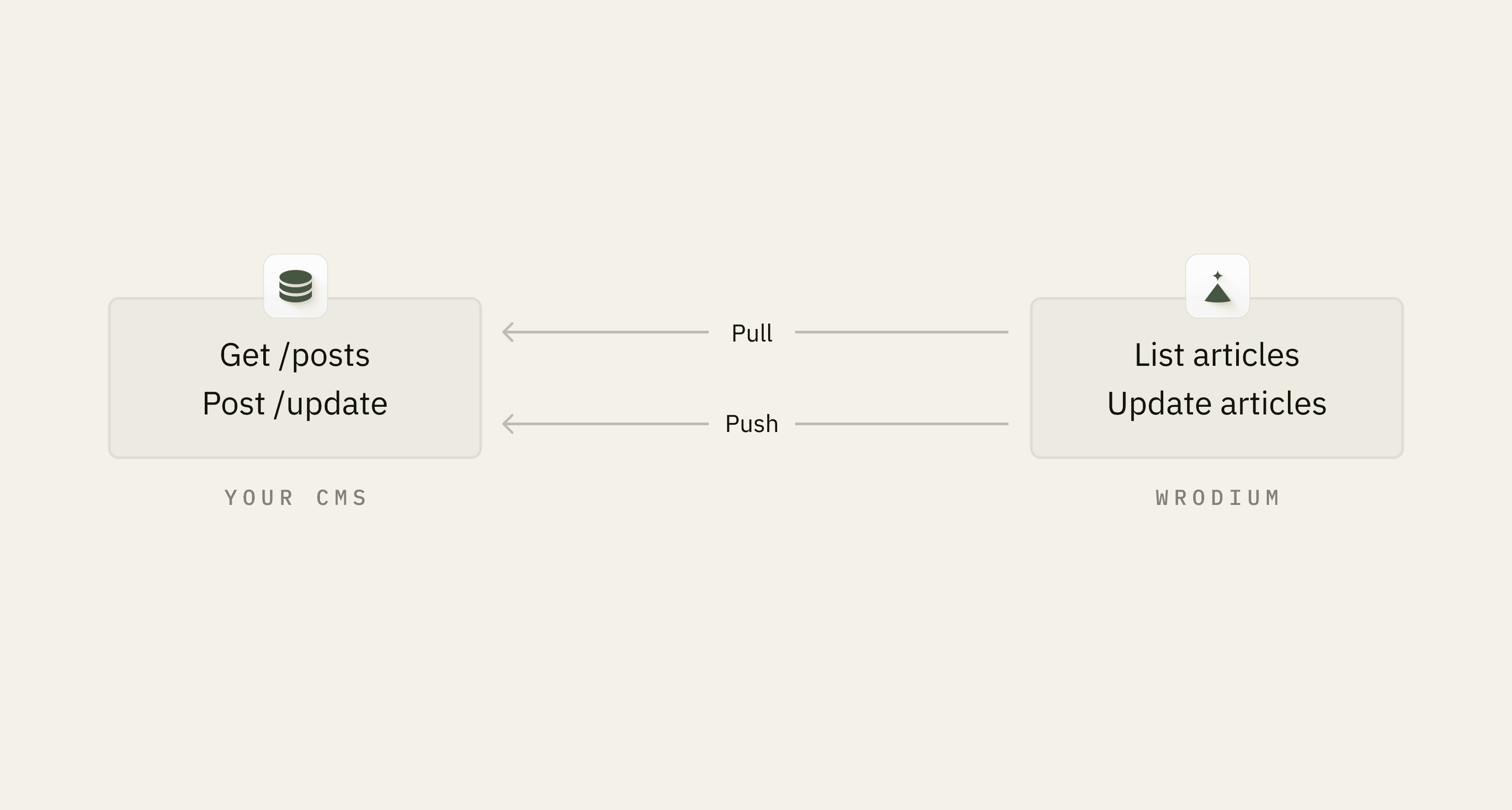
You provide two endpoints:

  1. Pull endpoint: Returns a list of articles (GET)

  2. Update endpoint: Receives updated content (POST)

Custom Webhook Integration

Connect any CMS or content system to Wrodium using custom webhooks. This is the most flexible integration option for headless CMS platforms, custom-built systems, or any API-based content source.

When to Use Webhooks

Use the webhook integration when:

  • Your CMS isn't directly supported (not WordPress, Webflow, Contentful, Ghost, or Framer)

  • You have a custom-built content management system

  • You need to integrate with multiple content sources

  • You want maximum control over the data format

How It Works


You provide two endpoints:

  1. Pull endpoint: Returns a list of articles (GET)

  2. Update endpoint: Receives updated content (POST)

Setup Steps

Step 1: Create Your Pull Endpoint

Build an endpoint that returns articles in this format:

[
  {
    "id": "article-123",
    "title": "Your Article Title",
    "content_html": "<p>Your article content...</p>",
    "excerpt": "A brief summary of the article",
    "published_at": "2024-01-15T10:30:00Z",
    "status": "published",
    "url": "https://yourblog.com/article-123"
  },
  {
    "id": "article-456",
    "title": "Another Article",
    "content_html": "<p>More content...</p>",
    "excerpt": "Another summary",
    "published_at": "2024-01-10T14:00:00Z",
    "status": "published",
    "url": "https://yourblog.com/article-456"
  }
]

Required fields:

Field

Type

Description

id

string

Unique identifier

title

string

Article title

content_html

string

Full HTML content

Optional fields:

Field

Type

Description

excerpt

string

Short summary

published_at

string (ISO 8601)

Publication date

status

string

published, draft, etc.

url

string

Public URL

Step 2: Create Your Update Endpoint

Build an endpoint that accepts updated content:

Request body:

{
  "id": "article-123",
  "title": "Updated Title",
  "content_html": "<p>Optimized content...</p>",
  "excerpt": "Updated summary",
  "slug": "updated-slug",
  "publish": true
}

Expected response:
Return the updated article in the same format as the pull endpoint.

Step 3: Configure Wrodium

  1. Go to Settings → CMS Connection in Wrodium

  2. Select Custom Webhook as your provider

  3. Enter your configuration:

Field

Value

Pull URL

https://your-api.com/wrodium/articles

Update URL

https://your-api.com/wrodium/update

Auth Header Name

X-API-Key (or Authorization)

Auth Header Value

Your API key or token

  1. Click Test Connection then Save

Configuration Schema

{
  "provider": "webhook",
  "provider_config": {
    "pull_url": "https://your-api.com/wrodium/articles",
    "update_url": "https://your-api.com/wrodium/update",
    "headers": {
      "X-API-Key": "your-secret-api-key",
      "X-Custom-Header": "optional-value"
    }
  }
}

API Behavior

Listing Articles (Pull)

Wrodium sends:


Updating Articles (Push)

Wrodium sends:

POST {update_url}

Headers:
  X-API-Key: your-secret-api-key
  Content-Type: application/json

Body:
{
  "id": "article-123",
  "title": "Updated Title",
  "content_html": "<p>Optimized content...</p>

Example Implementation

Node.js / Express

const express = require('express');
const app = express();

app.use(express.json());

// Your existing article storage
const articles = new Map();

// Authentication middleware
function authenticate(req, res, next) {
  const apiKey = req.headers['x-api-key'];
  if (apiKey !== process.env.WRODIUM_API_KEY) {
    return res.status(401).json({ error: 'Unauthorized' });
  }
  next();
}

// Pull endpoint - List articles
app.get('/wrodium/articles', authenticate, (req, res) => {
  const limit = parseInt(req.query.limit) || 20;
  
  // Fetch from your database
  const articleList = Array.from(articles.values())
    .slice(0, limit)
    .map(article => ({
      id: article.id,
      title: article.title,
      content_html: article.content,
      excerpt: article.excerpt || '',
      published_at: article.publishedAt?.toISOString(),
      status: article.status,
      url: `https://yourblog.com/${article.slug}`,
    }));
  
  res.json(articleList);
});

// Update endpoint - Receive optimized content
app.post('/wrodium/update', authenticate, (req, res) => {
  const { id, title, content_html, excerpt, slug, publish } = req.body;
  
  // Update in your database
  const article = articles.get(id);
  if (!article) {
    return res.status(404).json({ error: 'Article not found' });
  }
  
  article.title = title ?? article.title;
  article.content = content_html ?? article.content;
  article.excerpt = excerpt ?? article.excerpt;
  article.slug = slug ?? article.slug;
  if (publish) {
    article.status = 'published';
  }
  article.updatedAt = new Date();
  
  articles.set(id, article);
  
  // Return updated article
  res.json({
    id: article.id,
    title: article.title,
    content_html: article.content,
    excerpt: article.excerpt,
    published_at: article.publishedAt?.toISOString(),
    status: article.status,
    url: `https://yourblog.com/${article.slug}`,
  });
});

app.listen(3000);

Python / FastAPI

from fastapi import FastAPI, Header, HTTPException, Query
from pydantic import BaseModel
from typing import List, Optional
from datetime import datetime
import os

app = FastAPI()

# Your article storage
articles_db = {}

def verify_api_key(x_api_key: str = Header(...)):
    if x_api_key != os.environ.get("WRODIUM_API_KEY"):
        raise HTTPException(status_code=401, detail="Unauthorized")

class Article(BaseModel):
    id: str
    title: str
    content_html: str
    excerpt: str = ""
    published_at: Optional[str] = None
    status: str = "draft"
    url: Optional[str] = None

class UpdateRequest(BaseModel):
    id: str
    title: Optional[str] = None
    content_html: Optional[str] = None
    excerpt: Optional[str] = None
    slug: Optional[str] = None
    publish: bool = True

# Pull endpoint
@app.get("/wrodium/articles", response_model=List[Article])
def list_articles(
    limit: int = Query(20, ge=1, le=100),
    x_api_key: str = Header(...),
):
    verify_api_key(x_api_key)
    
    # Fetch from your database
    return list(articles_db.values())[:limit]

# Update endpoint
@app.post("/wrodium/update", response_model=Article)
def update_article(
    update: UpdateRequest,
    x_api_key: str = Header(...),
):
    verify_api_key(x_api_key)
    
    if update.id not in articles_db:
        raise HTTPException(status_code=404, detail="Article not found")
    
    article = articles_db[update.id]
    
    if update.title is not None:
        article["title"] = update.title
    if update.content_html is not None:
        article["content_html"] = update.content_html
    if update.excerpt is not None:
        article["excerpt"] = update.excerpt
    if update.publish:
        article["status"] = "published"
    
    articles_db[update.id] = article
    
    return Article(**article)

PHP / Laravel

<?php

namespace App\Http\Controllers;

use Illuminate\Http\Request;
use App\Models\Article;

class WrodiumController extends Controller
{
    public function __construct()
    {
        $this->middleware(function ($request, $next) {
            $apiKey = $request->header('X-API-Key');
            if ($apiKey !== config('services.wrodium.api_key')) {
                return response()->json(['error' => 'Unauthorized'], 401);
            }
            return $next($request);
        });
    }

    // Pull endpoint
    public function listArticles(Request $request)
    {
        $limit = $request->query('limit', 20);
        
        $articles = Article::published()
            ->orderBy('published_at', 'desc')
            ->limit($limit)
            ->get()
            ->map(function ($article) {
                return [
                    'id' => (string) $article->id,
                    'title' => $article->title,
                    'content_html' => $article->content,
                    'excerpt' => $article->excerpt ?? '',
                    'published_at' => $article->published_at?->toIso8601String(),
                    'status' => $article->status,
                    'url' => route('articles.show', $article->slug),
                ];
            });
        
        return response()->json($articles);
    }

    // Update endpoint
    public function updateArticle(Request $request)
    {
        $article = Article::findOrFail($request->input('id'));
        
        $article->fill([
            'title' => $request->input('title', $article->title),
            'content' => $request->input('content_html', $article->content),
            'excerpt' => $request->input('excerpt', $article->excerpt),
            'slug' => $request->input('slug', $article->slug),
        ]);
        
        if ($request->input('publish', false)) {
            $article->status = 'published';
        }
        
        $article->save();
        
        return response()->json([
            'id' => (string) $article->id,
            'title' => $article->title,
            'content_html' => $article->content,
            'excerpt' => $article->excerpt ?? '',
            'published_at' => $article->published_at?->toIso8601String(),
            'status' => $article->status,
            'url' => route('articles.show', $article->slug),
        ]);
    }
}

Security Best Practices

1. Use HTTPS

Always use HTTPS for your webhook endpoints.

2. Validate API Keys

Check the API key on every request:

if request.headers.get("X-API-Key") != expected_key:
    raise HTTPException(401, "Unauthorized")

3. Rate Limiting

Implement rate limiting to prevent abuse:

from slowapi import Limiter
limiter = Limiter(key_func=get_remote_address)

@app.get("/wrodium/articles")
@limiter.limit("60/minute")
def list_articles():
    ...

4. Input Validation

Validate all input data before processing:

class UpdateRequest(BaseModel):
    id: str = Field(..., min_length=1, max_length=100)
    title: str | None = Field(None, max_length=500)
    content_html: str | None = Field(None, max_length=500000)

5. IP Whitelisting (Optional)

Restrict access to Wrodium's IP addresses:

WRODIUM_IPS = ["1.2.3.4", "5.6.7.8"]

@app.middleware("http")
async def check_ip(request: Request, call_next):
    if request.url.path.startswith("/wrodium/"):
        client_ip = request.client.host
        if client_ip not in WRODIUM_IPS:
            return JSONResponse({"error": "Forbidden"}, status_code=403)
    return await call_next(request)

Troubleshooting

"Connection Refused" Error

  • Verify your endpoint URLs are correct

  • Check firewall rules allow incoming connections

  • Ensure your server is running

"401 Unauthorized" Error

  • Verify the API key matches in both Wrodium and your server

  • Check header name matches exactly (X-API-Key vs Authorization)

"Invalid JSON" Error

  • Ensure response Content-Type is application/json

  • Verify JSON structure matches the expected format

  • Check for encoding issues (use UTF-8)

Timeout Errors

  • Wrodium waits 15 seconds for responses

  • Optimize slow database queries

  • Consider pagination for large article lists

Advanced: Bidirectional Sync

For real-time sync, have your CMS call Wrodium when content changes:

# In your CMS after saving an article
import httpx

async def notify_wrodium(article_id: str):
    await httpx.post(
        "https://api.wrodium.com/webhooks/custom/{brand_id}",
        json={"event": "article.updated", "article_id": article_id},
        headers={"Authorization": f"Bearer {wrodium_api_key}"},
    )

Next Steps

Found this article insightful? Spread the words on…

Found this article insightful?
Spread the words on…

X.com

Share on X

X.com

Share on X

X.com

Share on X

X.com

Share on LinkedIn

X.com

Share on LinkedIn

X.com

Share on LinkedIn

Found this documentation insightful? Share it on…

X.com

LinkedIn

Contents

Checkout other documentations

Checkout other documentations

Checkout other documentations

Let us help you win on

ChatGPT

Let us help you win on

ChatGPT

Let us help you win on

ChatGPT